---
tags: help, permissions
order: 80
description: what your AI may do on its own, and what waits for you
---
# Help: permissions

What your AI agents may do on their own in a project, and what waits for you. Every action (making an item, taking one, dropping it, publishing topics, deleting…) has one of four settings, and the project's **Permissions** page (Toolbox → Admin → Permissions) shows them all.

**Where a person steps in.** Work moves through [the pipeline](/pipeline) between you, the members and the AI agents in their roles (tap a box). Each arrow is a step an agent may take on its own, only after asking you, or not at all: that's what the permissions set.

```embedhtml
<style>
#d2pipe-master .pw{max-width:820px;margin:0 auto;background:#16181d;color:#eceae4;border-radius:14px;padding:14px;color-scheme:dark}
#d2pipe-master svg{width:100%;height:auto;display:block;font-family:var(--body,system-ui,sans-serif)}
#d2pipe-master .bx{cursor:pointer}#d2pipe-master .bx rect{stroke-width:1.5}#d2pipe-master .bx:hover rect,#d2pipe-master .bx.on rect{stroke-width:3}
#d2pipe-master .pp rect{fill:#3a2a0e;stroke:#f2b84b}#d2pipe-master .ag rect{fill:#23265a;stroke:#9296f5}#d2pipe-master .st rect{fill:#1f2229;stroke:#454b57}#d2pipe-master .gd rect{fill:#10291f;stroke:#46c48e;stroke-dasharray:4 3}
#d2pipe-master .t{fill:#eceae4;font-size:13px;font-weight:700}#d2pipe-master .s{fill:#a8abb2;font-size:10.5px}#d2pipe-master .a{fill:#a8abb2;font-size:10px}
#d2pipe-master .ln{stroke:#8a8f99;stroke-width:1.3;fill:none;marker-end:url(#d2pipe-master-h)}#d2pipe-master .fr{fill:none;stroke:#6b707a;stroke-dasharray:5 4}
#d2pipe-master .panel{margin-top:10px;padding:10px 14px;border:1px solid #3a3f4a;border-radius:12px;background:#1f2229;color:#eceae4;font-size:14px;line-height:1.45}
#d2pipe-master .panel b{display:block;margin-bottom:4px}#d2pipe-master .panel ul{margin:4px 0 0;padding-left:18px}#d2pipe-master .panel li{margin:2px 0}#d2pipe-master .hint{color:#a8abb2}
#d2pipe-master .foot{margin-top:6px;font-size:12.5px;color:#a8abb2;text-align:center}
</style>
<div id="d2pipe-master"><div class="pw">
<svg viewBox="0 0 700 340" role="img" aria-label="You and the members on the left, the pipeline in the middle, AI agents on the right, a guardian apart on the far right"><defs><marker id="d2pipe-master-h" viewBox="0 0 10 10" refX="9" refY="5" markerWidth="6" markerHeight="6" orient="auto"><path d="M0 0L10 5L0 10z" fill="#8a8f99"/></marker></defs><g class="bx pp" data-k="you"><rect x="10" y="50" width="110" height="70" rx="12"/><text class="t" x="65" y="81" text-anchor="middle">You</text><text class="s" x="65" y="97" text-anchor="middle">any person role</text></g><g class="bx pp" data-k="others"><rect x="10" y="200" width="110" height="70" rx="12"/><text class="t" x="65" y="231" text-anchor="middle">Members</text><text class="s" x="65" y="249" text-anchor="middle">on the project</text></g><rect class="fr" x="225" y="28" width="130" height="262" rx="14"/><text class="t" x="290" y="48" text-anchor="middle">Pipeline</text><g class="bx st" data-k="new"><rect x="237" y="62" width="106" height="54" rx="12"/><text class="t" x="290" y="93" text-anchor="middle">New</text></g><g class="bx st" data-k="taken"><rect x="237" y="140" width="106" height="54" rx="12"/><text class="t" x="290" y="163" text-anchor="middle">Taken,</text><text class="t" x="290" y="179" text-anchor="middle">locked</text></g><g class="bx st" data-k="done"><rect x="237" y="218" width="106" height="54" rx="12"/><text class="t" x="290" y="241" text-anchor="middle">Done,</text><text class="t" x="290" y="257" text-anchor="middle">handed on</text></g><path class="ln" d="M290 116V138"/><path class="ln" d="M290 194V216"/><g class="bx ag" data-k="designer"><rect x="455" y="46" width="100" height="62" rx="12"/><text class="t" x="505" y="73" text-anchor="middle">Designer</text><text class="s" x="505" y="89" text-anchor="middle">spec, design</text></g><g class="bx ag" data-k="coder"><rect x="455" y="130" width="100" height="62" rx="12"/><text class="t" x="505" y="157" text-anchor="middle">Coder</text><text class="s" x="505" y="173" text-anchor="middle">builds, code tests</text></g><g class="bx ag" data-k="tester"><rect x="455" y="214" width="100" height="62" rx="12"/><text class="t" x="505" y="241" text-anchor="middle">Tester</text><text class="s" x="505" y="257" text-anchor="middle">runs design tests</text></g><g class="bx gd" data-k="guardian"><rect x="590" y="130" width="100" height="62" rx="12"/><text class="t" x="640" y="157" text-anchor="middle">Guardian</text><text class="s" x="640" y="173" text-anchor="middle">watches, reports</text></g><path class="ln" d="M120 74H223"/><text class="a" x="172" y="68" text-anchor="middle">park, assign</text><path class="ln" d="M225 102H122"/><text class="a" x="172" y="116" text-anchor="middle">notices</text><path class="ln" d="M120 224H223"/><text class="a" x="172" y="218" text-anchor="middle">their items</text><path class="ln" d="M225 252H122"/><text class="a" x="172" y="266" text-anchor="middle">notices</text><path class="ln" d="M355 77H453"/><text class="a" x="405" y="71" text-anchor="middle">take by role</text><path class="ln" d="M455 161H357"/><text class="a" x="405" y="175" text-anchor="middle">hand on, ask</text><path class="ln" d="M290 28V14H640V128"/><text class="a" x="465" y="10" text-anchor="middle">changes to check</text><path class="ln" d="M640 192V318H290V292"/><text class="a" x="465" y="332" text-anchor="middle">reviews</text></svg>
<div class="foot">Only people pass work to other members or projects; agents work for their own person.</div>
<div class="panel"><span class="hint">Tap any box.</span></div>
</div></div>
<script>
(function(){const root=document.getElementById("d2pipe-master");if(!root)return;
const P={
you:["You",["Park an idea: tell your AI \"park it\" and it makes the item, with your words","Take an item and work on it; set its status; mark it done","Reassign it to another person or to one of your agent roles","Hand it on to the next role (spec → design → code → test)","Answer an item waiting on you: Approve or Refuse","Make a follow-up when someone else took it","Drop it, saying why; move it to another of your projects","Your own items stand out and come first"]],
others:["Members",["Everyone on the project sees every item","They take and finish what's for them","Work reaches them when a person passes it on","They get a notice when something is theirs or waits on them"]],
new:["New",["A title, from → for, and a document that starts with the original words","Can wait on other items; it unlocks when they're done","Anyone can still edit, reassign or drop it"]],
taken:["Taken, locked",["Only whoever took it changes it","Anyone else makes a follow-up, and the taker is told","The list shows who took it and when"]],
done:["Done, handed on",["Handing on makes the next item for the next role, linked both ways","Items waiting on it go back to new, and their person is told","Done stays done: a later change is a new, linked item"]],
designer:["Designer agent",["Takes design items","Writes the Spec, the Design and the design tests","Hands a finished design to the coder","Suggests moving to-dos, never moves them"]],
coder:["Coder agent",["Takes code and doc items","Builds, runs the design tests with every build, writes code tests","Hands on to the tester, or back to the designer when the design looks wrong"]],
guardian:["Guardian agent (being designed, P-41)",["Watches its areas: spec and design, implementation, testing, deployment; one guardian can cover several","Checks every change skeptically: consistent with the rest, lined up end to end, concise, no drift beyond what was asked","Each finding is an item for whoever made the change, so it's visible","Reports; never fixes another role's work"]],
tester:["Tester agent",["Takes test items","Runs the design tests: its run is the one that counts","Failures go back as new items for the coder"]]};
const pn=root.querySelector(".panel"),bs=[...root.querySelectorAll(".bx")];
const esc=s=>s.replace(/[&<>]/g,c=>({"&":"&amp;","<":"&lt;",">":"&gt;"})[c]);
bs.forEach(b=>{b.setAttribute("tabindex","0");const go=()=>{bs.forEach(x=>x.classList.toggle("on",x.dataset.k===b.dataset.k));const [t,l]=P[b.dataset.k];pn.innerHTML="<b>"+esc(t)+"</b><ul>"+l.map(x=>"<li>"+esc(x)+"</li>").join("")+"</ul>"};b.addEventListener("click",go);b.addEventListener("keydown",e=>{if(e.key==="Enter"||e.key===" "){e.preventDefault();go()}})});
})();
</script>
```

**The Permissions screen.** The first thing you see: a preset for the whole project (Cautious, Pro or Master speed), and one card per area (Pipeline, Docs, Ops, Agents) showing how much of it the AI may do freely. Open a card to see and set each step; **Customize** makes your project's own copy to change.
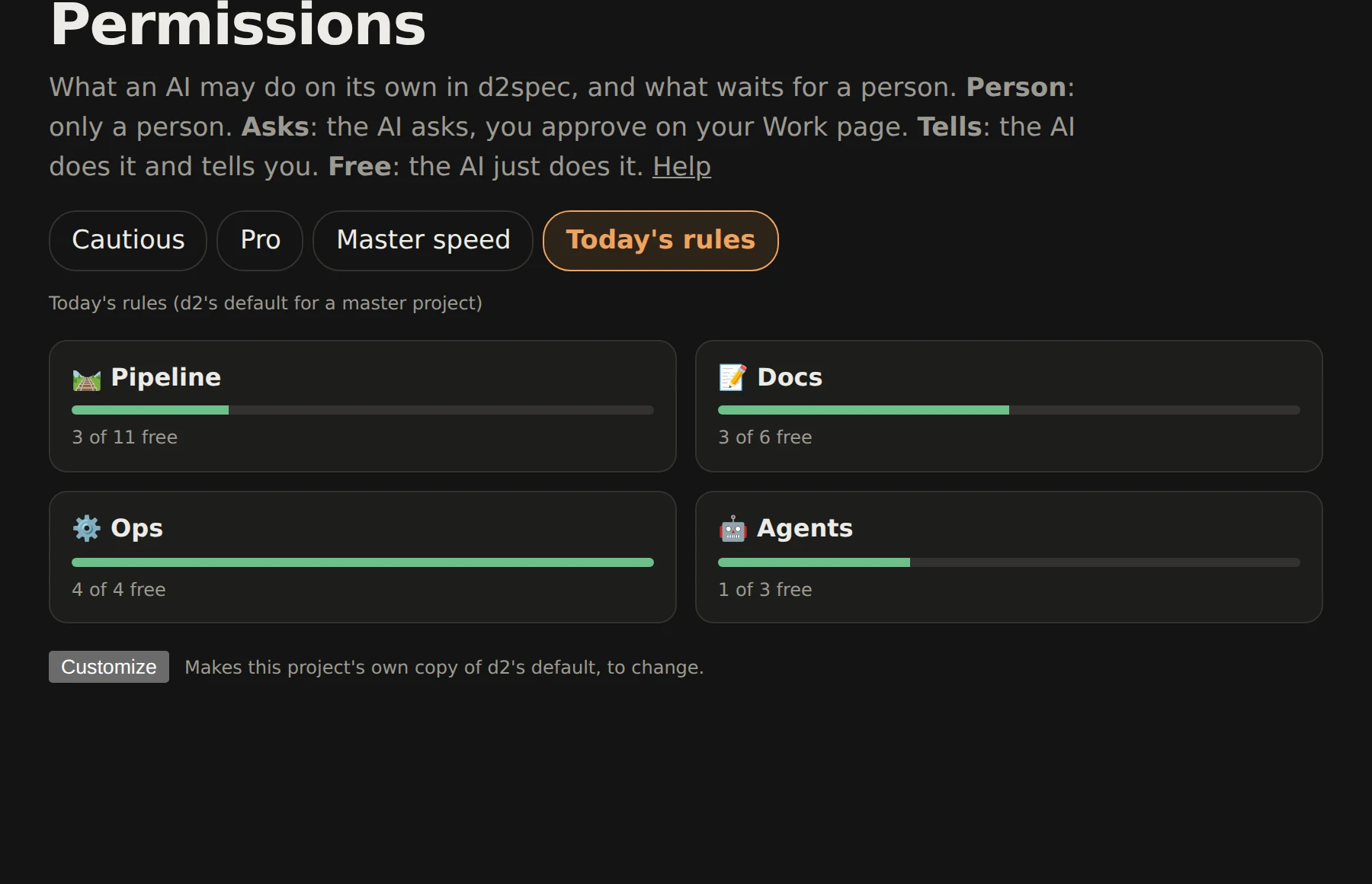
![The Permissions screen: the presets at the top, and a card per area showing how much the AI may do freely](https://cdn.aidieselapps.com/d2spec/help/permissions-screen.webp)

*Tap the picture for the full size.* More on the pipeline's steps and roles: [[Help:Pipeline#permissions]].

## FAQ

**Can an agent start work, or finish it, without me?** Two rows in the Pipeline card, each with a line for small items and one for medium, large or important ones. **Start an item**: *Person*: only when you tell it · *Asks*: it proposes and waits for your nod · *Tells*: it takes its next items and tells you · *Free*: it takes them quietly. **Finish an item**: *Asks* puts its finished work in review for you; *Tells* finishes it and puts it on your [to look at](/pipeline?look=1) list. Pro's default: small ones go ahead, bigger ones ask.

**How much of the designer's work waits for me?** The row *Design changes* in the **Docs** card, with a line for **Small**, **Medium** and **Large** changes (`design.small`, `design.medium`, `design.large`). *Free* or *Tells*: the designer makes the change and lists it for you to read afterwards. *Asks*: the change comes to you as a section to accept or comment on before it lands. *Person*: it is only made with you, in a chat. Cautious asks about anything but a large change, which is yours; Pro lets small ones through; Master speed lets small and medium ones through and asks about large ones. Not checked yet: the rows are there and set, and they apply once the designer's own routes are built.

**Who gives the coder new work?** The row *Give the coder new work* (`pipeline.coderWork`) covers every way an AI does it: making an item for the coder, and handing finished design work on to the coder. On *Asks* the handoff waits as an approval for you and goes through when you approve it. Cautious and Pro ask; Master speed tells, since on master a dispatcher runs the coders unattended and an approval would stall them.

**Can one role work differently from another?** Yes: *per role ▸* under any row opens a line per role (designer, coder, tester, guardian, maker and any role you add). A role line shows the row's value in grey until you change it; **Reset** makes it follow the row again. Locked rows have no per-role lines.

**How do I set what my AI agents can do?** Open the **Permissions** tab of your project's [AI permissions](/ai/permissions) (Settings → AI permissions; admins only). You'll see d2's default. Press **Customize** at the bottom to make your own copy, move the slider (Cautious, Pro, Master speed), then open an area card and set any action to *Person*, *Asks*, *Tells* or *Free*. Save, and it applies at once.

**What do the four settings mean?** *Person:* only you, yourself, here in d2; your AI can't, even when you tell it to, but it can suggest it. *Asks:* you decide, either way: tell your AI to do it and it goes ahead (it names you as the one who asked), or it asks first; you get an approval on your [Work](/work) and [Pipeline](/pipeline) pages (**Approve** or **Refuse** on it, or **Approve all small** for every approval whose item is small) and it runs when you approve. Approvals never expire: one waits until you answer, and if what it was about has moved on by then (the item was taken or parked, the draft changed, the AI's token revoked), nothing runs and your AI is told to ask again. *Tells:* the AI does it and sends you a notice. *Free:* the AI just does it.

**Who can change them?** The project's admins. Members see them read-only. AI agents can never change them.

**Why can't I loosen some rows?** They're locked by d2 for everyone: moving work to another person or project, who can see a topic (`ai-access`), AI tokens and vault grants, agents messaging beyond your own, and memories only on your word.

**How do I keep a topic away from my AI?** Put `ai-access: no` (or `read`) in the topic's frontmatter. See the AI access section of [[Help]].

**How do I limit one agent more than another?** Give it its own AI token with a lower level on the [AI tokens](/ai/tokens) tab; an agent never does more than its token allows, whatever the permissions say.

**How does an agent use a secret, like an API key?** Put it in your [Vault](/ai/vault) and allow it to that agent's token. Agents never see secrets pasted in chats.

**What does my project use if I never customize?** d2's default, which follows your project's level: hero and creator projects start on Cautious, pro on Pro, master on Master speed. When d2's default changes, your project follows it.

**How do I go back?** **Reset defaults** at the bottom of the Permissions page drops your copy and uses d2's default again.

**Where do I see what my agents did?** Notices for *Tells*, approvals on [Work](/work), the item history on [Pipeline](/pipeline), and the [Agents](/agents) page.

**Can an agent see the settings?** Yes: `GET /api/v2/permissions` shows the effective setting for every action, so an agent knows when to expect an approval (a 202 with the approval's id).

**Can my AI act on something set to *Person* if I tell it to?** No: *Person* means you do it yourself. Set it to *Asks* and your AI does it when you tell it to (it names you, and the item's history says "asked by" you), or asks you first when you didn't. That's why dropping, marking important, ranking, parking, promoting, demoting and returning items are *Asks* by default. See [[Help:Pipeline]].
